


Employees across every function are expected to make faster, better-informed decisions, but the information that they need rarely lives in one place. Workforce intelligence (who is in your organization, how they are performing, and where the gaps are) is one of the most valuable signals an enterprise has, and platforms like Visier are purpose-built to surface it. However, that intelligence only reaches its full value when it’s connected to the internal policies, plans, and context that give it direction. That context also often lives somewhere else entirely.
Amazon Quick is the Agentic AI workspace where that connection happens. It brings together enterprise knowledge, business intelligence, and workflow automation. Its intelligent agents retrieve information and reason across all of these layers simultaneously, interpreting live data alongside organizational context to produce answers that are ready to act on. When Visier workforce intelligence works in tandem with the Amazon Quick enterprise knowledge layer, the result is an answer that draws on the full context and is ready to act.
In this post, we show how connecting the Visier Workforce AI platform with Amazon Quick through Model Context Protocol (MCP) gives every knowledge worker a unified agentic workspace to ask questions in. Visier helps ground the workspace in live workforce data and the organizational context that surrounds it while letting your users act on the conversational results without switching tools.
1. Understanding the components
In this post, we demonstrate example day-to-day workflows for two people preparing for the same leadership meeting: Maya, an HR Business partner building a workforce health briefing, and David, a finance manager tracking headcount against budget. Both need answers that cut across multiple sources, such as live workforce data, internal targets, hiring policies, and historical context. This integration is built for business users who work with people data as part of their day-to-day decisions. They need answers grounded in the right data sources. This integration helps Amazon Quick agents go beyond retrieving information and act on it.
Amazon Quick
Amazon Quick is an agentic AI workspace that acts as a unified interface for business users across the organization, provides business users with a set of agentic teammates that quickly answer questions at work and turn those answers into action.
For Maya and David, Amazon Quick is their AI workspace where they ask questions and build agents that work on their behalf and automate their processes. Weekly workflows and threshold alerts that would otherwise require manual effort and research every time are saved in Amazon Quick.
Visier
Visier is a cloud based Workforce AI platform that unifies workforce data from across an organization. It brings together HRIS, payroll, talent management, and applicant tracking into a single intelligence layer. You can use it to answer complex workforce questions in minutes through its AI assistant Vee, backed by extensive pre-built metrics and industry benchmarks from anonymized employee records.
Through its MCP server, Visier acts as a universal connector that delivers governed people insights directly into the enterprise AI tools where decisions are made.
For Maya, Visier is the authoritative source for workforce intelligence. It provides the high performer counts, average tenure figures, and attrition trends that she needs to assess organizational health. For David, it provides the live headcount and distribution figures that financial targets are measured against.
The Model Context Protocol
MCP is an open standard that enables AI agents to connect to external data sources and tools. Think of it as a universal adapter that allows Amazon Quick to communicate with Visier’s analyst agent, Vee in a structured and secure way without building custom integrations from scratch. Visier exposes its workforce analytics capabilities through an MCP server. Amazon Quick includes a built-in MCP client that discovers those tools and makes them available to its agents, research workflows, and automations.
2. Benefits for enterprises
Organizations often struggle to get a unified view of their workforce that combines live data with organizational context. A manager asking “Are we on track with our headcount budget?” needs numbers from one system and policy context from another. With Visier integrated into Amazon Quick using MCP, this gap closes:
- Unified workforce intelligence – Amazon Quick orchestrates across Visier’s live people analytics data and your internal enterprise knowledge, delivering synthesized answers that neither system could produce alone. A single question can return live headcount data cross-referenced against an approved budget document.
- Natural language access to employee data – Through Amazon Quick Agents, users can ask conversational questions and get instant answers backed by curated workforce data. Every response is attributed to its source, so users always know whether a figure came from Visier’s live workforce data or an internal policy document in Quick Spaces.
- Automated, repeatable workflows – Recurring workforce reviews, threshold alerts, and pre-meeting briefings can be built as automated Quick Flows that run on a schedule. The same analysis Maya and David ran manually in the demo can be configured once and delivered to their inboxes every Monday morning without any manual effort.
- Cross-functional decision support – The same pattern applies across any function where workforce data and organizational context need to come together to inform a decision.
- Governed and secure data access – Visier’s MCP server enforces data governance policies to surface only authorized workforce data through Amazon Quick. Enterprise knowledge in Quick Spaces maintains existing access controls within your organizational boundary.
- Reduced time to insight – What previously required hours of cross-referencing spreadsheets, toggling between dashboards, and manually building narratives can now be accomplished quickly from a single interface. The integration ensures that the answer always comes with the full picture of live workforce data alongside the organizational context that makes it actionable.
3. Prerequisites
Before setting up the Visier MCP integration with Amazon Quick, you need the following:
For more information about setting up Amazon Quick, see the Amazon Quick documentation.
4. Solution overview
At its core, this solution is built on the MCP. Visier hosts an MCP server that exposes its people analytics capabilities as a set of callable tools. Amazon Quick acts as the MCP client, discovering those tools and making them available to agents, research workflows, and automations. The two platforms remain independent, and through this connection, live workforce data from Visier becomes part of every Amazon Quick interaction.When a user asks a question:
- Amazon Quick interprets the intent and determines which sources are relevant
- If the question requires workforce data, it invokes Visier’s Vee agent through MCP to retrieve live analytics
- If the question requires organizational context, it draws from the relevant documents and knowledge sources available in Amazon Quick Spaces
- The two sources are brought together into a single, coherent response that reflects both live workforce data and the organizational context around it
When a question spans both systems, Amazon Quick identifies the right sources, hands off to Visier’s agent to retrieve live workforce intelligence, and draws on Quick Index and Quick Spaces for organizational context. The most relevant information from both is surfaced back to the user as a single, coherent answer.
5. Setting up the integration
Step 1: Configure Visier’s MCP server
Visier provides a prebuilt MCP server that exposes its workforce analytics capabilities as MCP tools. To configure it:
- In your Visier admin console, navigate to Settings > API & Integrations.
- Enable the MCP Server capability.
- Configure authentication credentials and data access scopes.
- Note the MCP server endpoint URL and authentication details.
For detailed instructions, refer to the Visier MCP Documentation.
Step 2: Add Visier as an MCP integration in Amazon Quick
Amazon Quick includes a built-in MCP client that you configure through an integration. To connect Visier:
- From the Amazon Quick home screen, select Integrations from the left navigation panel.
- Select the Actions tab in the main panel.
- Under Set up a new integration, locate the Model Context Protocol (MCP) tile and choose the plus (+) sign.
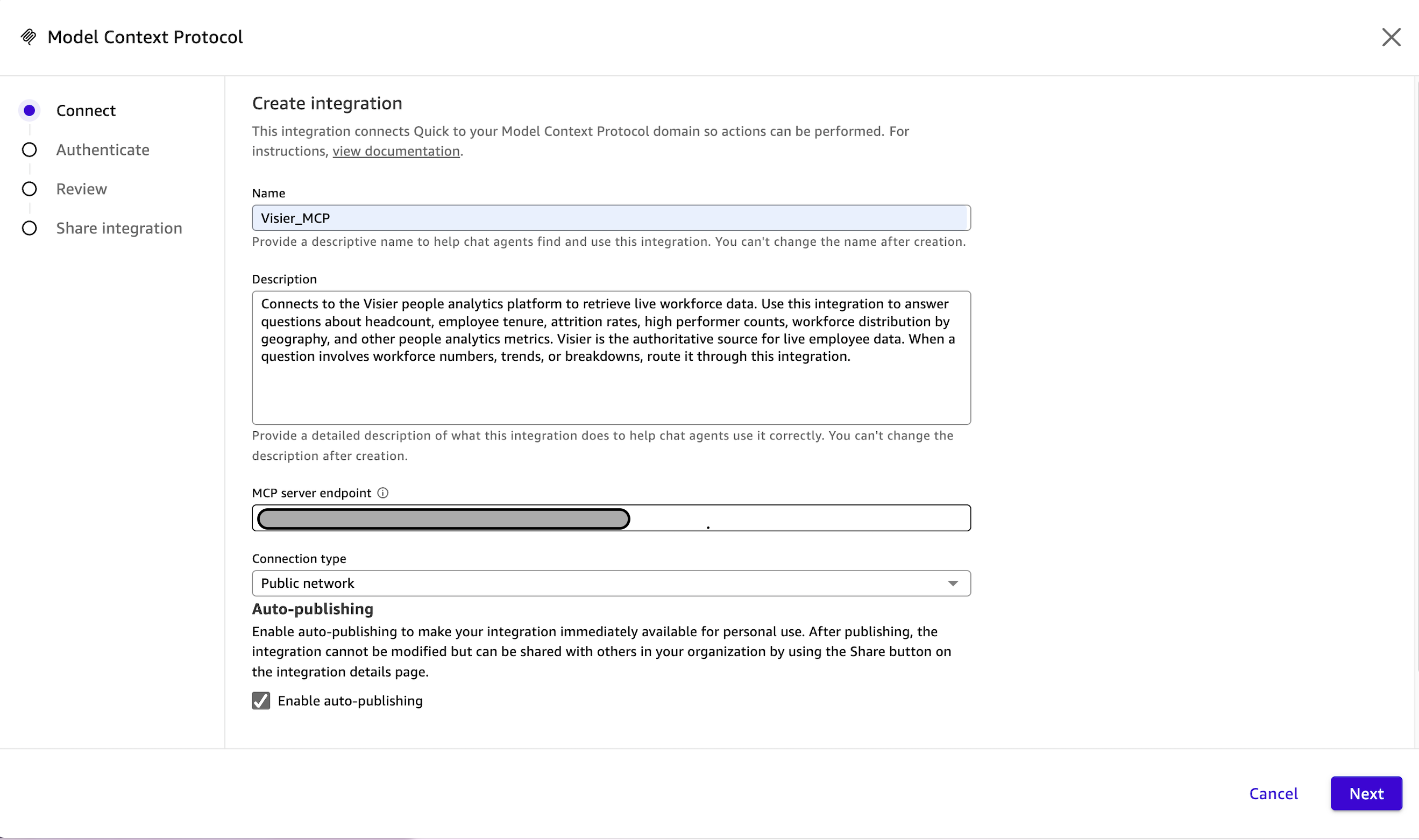
- On the Create Integration page, enter a descriptive Name, an optional Description, and the Visier MCP server endpoint URL from Step 1. Choose Next.
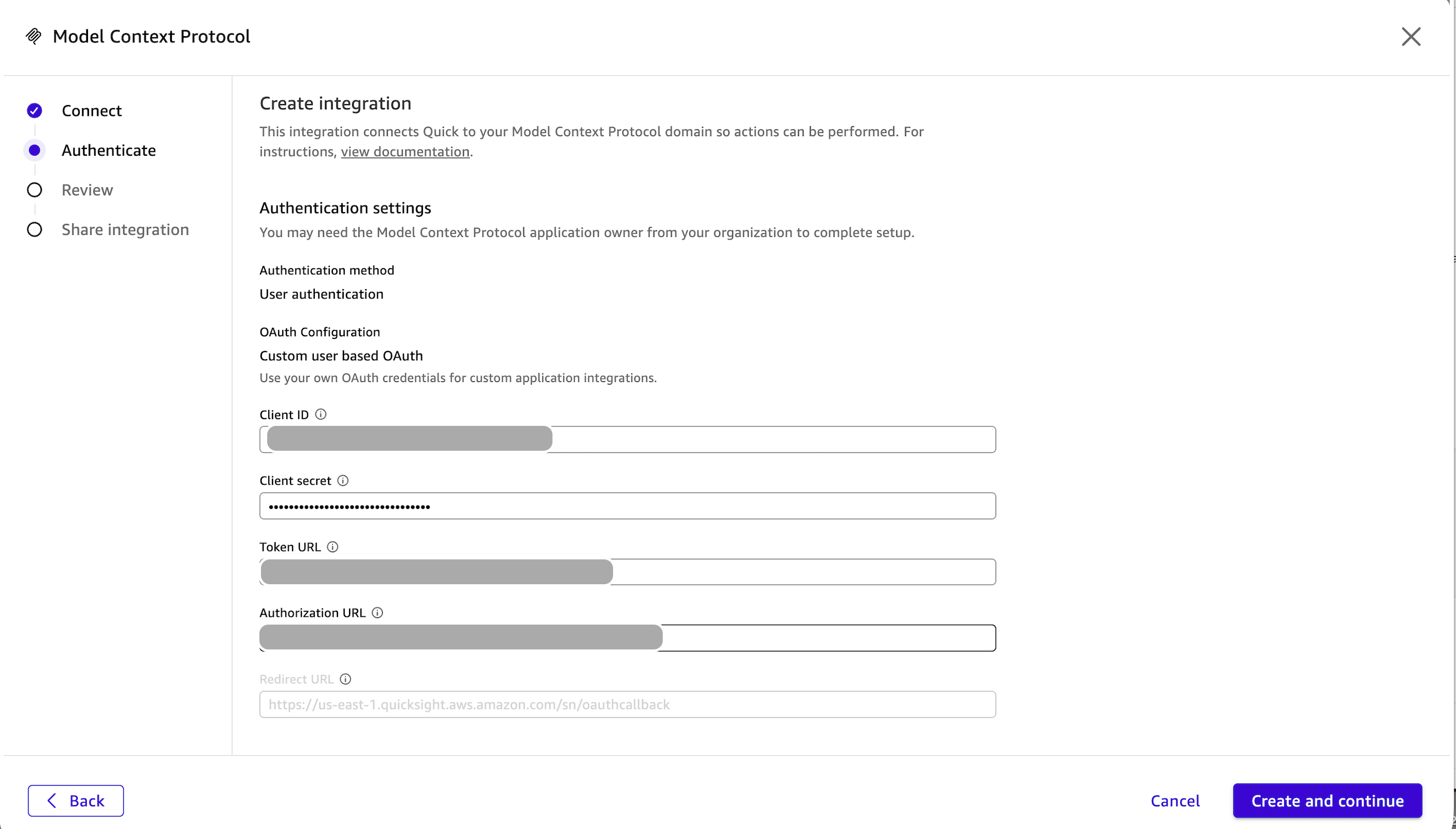
- Select the authentication method that matches your Visier MCP server configuration (user authentication, service authentication, or no authentication) and enter the required credentials. Choose Create and continue.
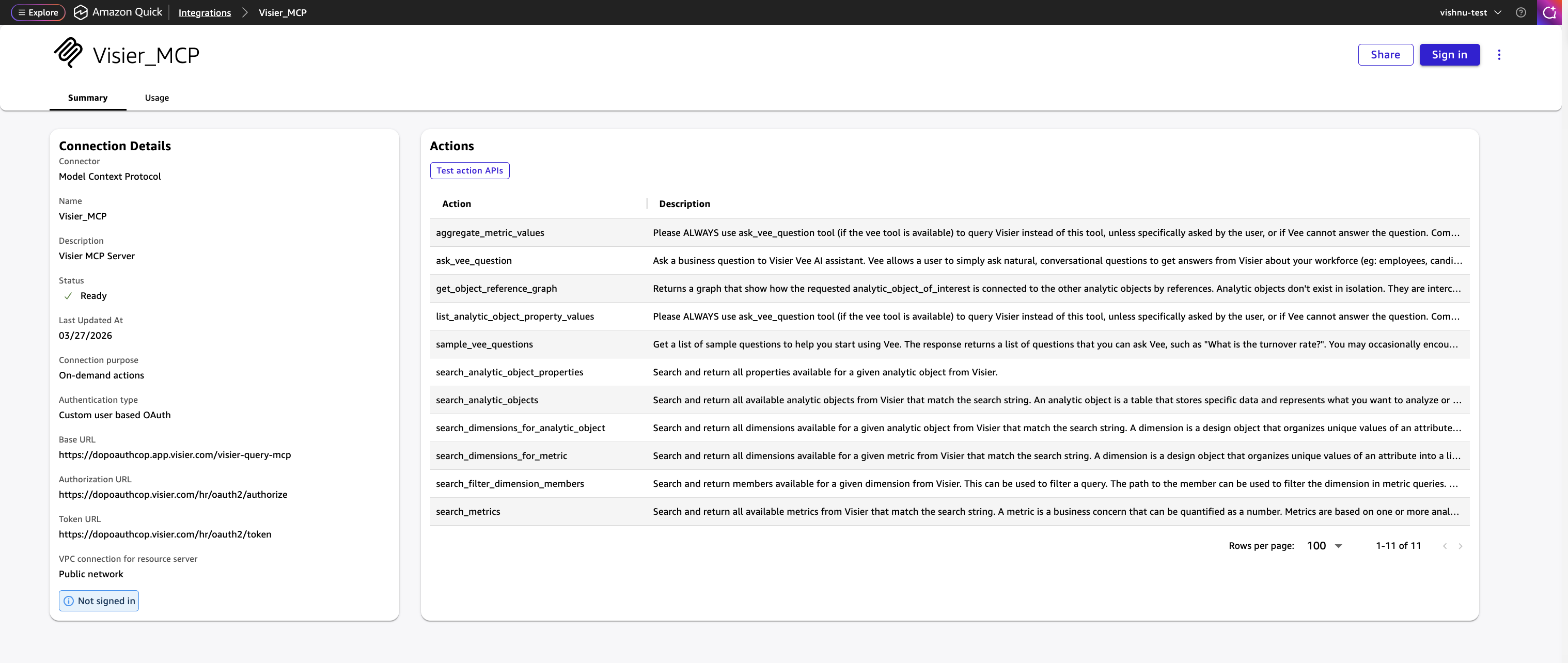
- Amazon Quick will discover the tools exposed by Visier’s MCP server (for example,
ask_vee_question,search_metrics,list_analytic_object_property_values). - Share the integration with other users who should be able to query Visier through Amazon Quick, then choose Done.
After configured, Visier workforce intelligence tools are available to the Amazon Quick agents and automations.
For more information about MCP integration in Amazon Quick, refer to Integrate external tools with Amazon Quick Agents using MCP and the MCP integration documentation.
Step 3: Curate your enterprise knowledge
Agents built in Amazon Quick use Spaces as their contextual boundary. Everything an organization knows, from internal policies and planning documents to team-specific knowledge contributed by individual users, is built up inside a Space and made available to the agent at query time. Multiple team members can contribute to a Space over time, so the knowledge grows with the organization rather than remaining static.
Next, you upload relevant internal documents to Quick Spaces, so the orchestrator has organizational context to complement Visier’s live data. To upload your documents:
- In Amazon Quick, navigate to Spaces and create a new space. Name it “Workforce Planning“.
- Upload your workforce planning documents, such as headcount budgets, and compensation guidelines.
- Upload policy documents, such as approval workflows, and compliance requirements.
- Configure space permissions to control which teams can access the content.
With Quick Spaces populated, the answers we get from Quick Agents get richer. This lets them combine live workforce data from Visier with your organization’s own context and return a complete answer in one place.
Example scenario
To demonstrate the integration, we walk through a scenario where Maya (HR Business Partner) and David (Finance Analyst) are preparing jointly for a leadership meeting. Their organization has connected Visier to Amazon Quick using MCP and has uploaded internal planning documents to Quick Spaces.For this example, they have added the following enterprise documents to Amazon Quick:
| Document | Purpose |
| FY26 Workforce Health Targets | Headcount goals, US distribution targets, retention rate benchmarks |
| Tenure and Retention Policy | Tenure milestones, at-risk thresholds, intervention triggers |
| High Performer Retention Playbook | High performer ratio thresholds, retention levers, escalation triggers |
| US Workforce Distribution Policy | Target US presence percentage, review cadence, rationale |
| Workforce Risk Briefing Template | Risk rating framework, what to escalate to leadership |
Here’s how the conversation unfolds:Each of the following turns note which data sources that the Amazon Quick agent queried to produce its response.
Turn 1: Getting the lay of the land
David: How many employees do we have, and how many are based in the US?
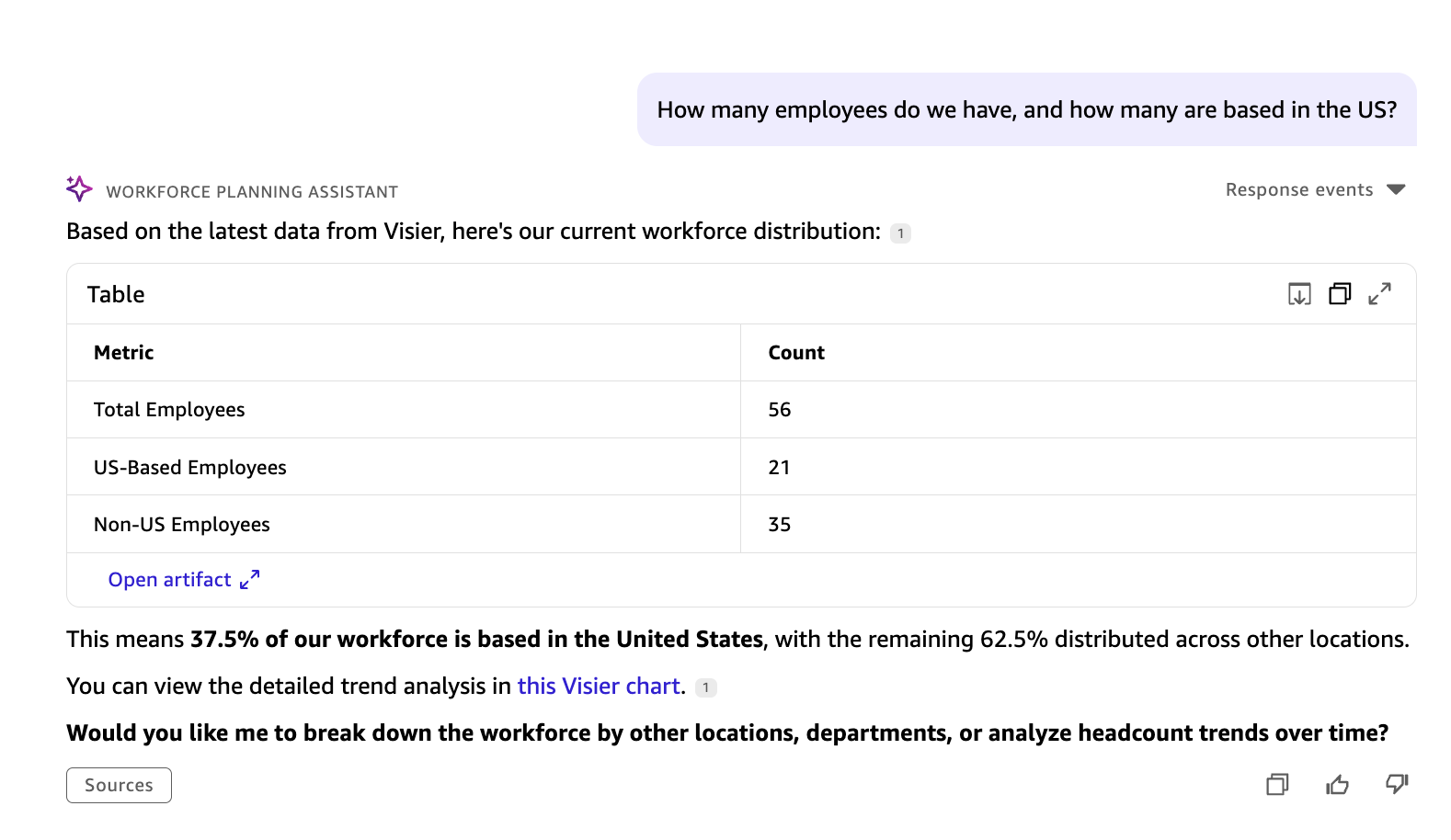
The Amazon Quick agent routes David’s question to Visier via MCP and returns the total employee count and US-based headcount from live workforce data.
Sources queried: Visier
Turn 2: Budget vs. actual, where intelligence meets context
David: How does our US headcount compare to our distribution targets?
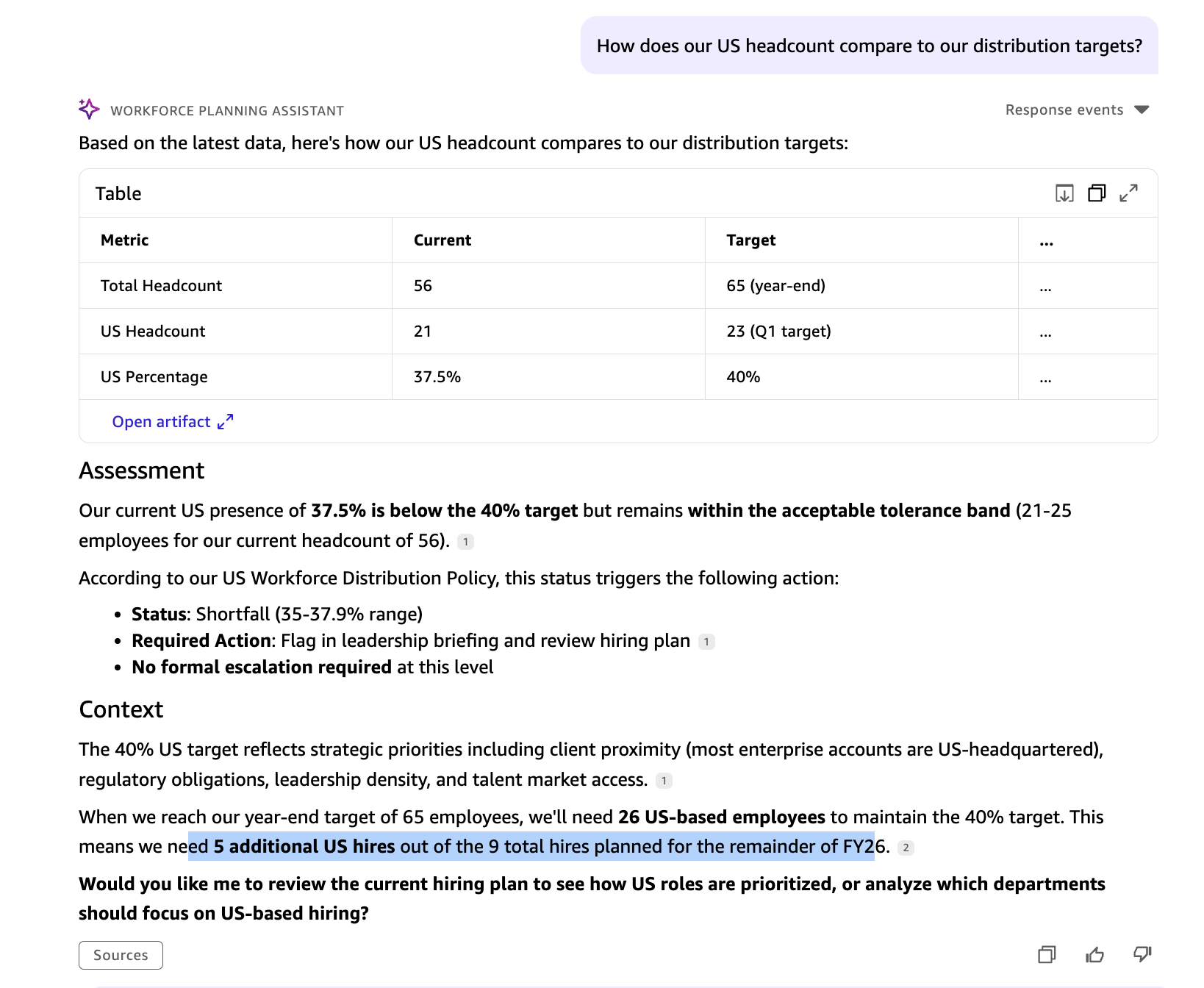
The agent queries Visier for live US headcount and retrieves the FY26 Workforce Health Targets document from Quick Spaces, comparing the actual figure against the approved distribution target.
Sources queried: Visier (live headcount) · Quick Spaces (FY26 Workforce Health Targets)
Turn 3 : Tenure landscape
Maya: What is the average tenure across our workforce, and which roles have the highest tenure?
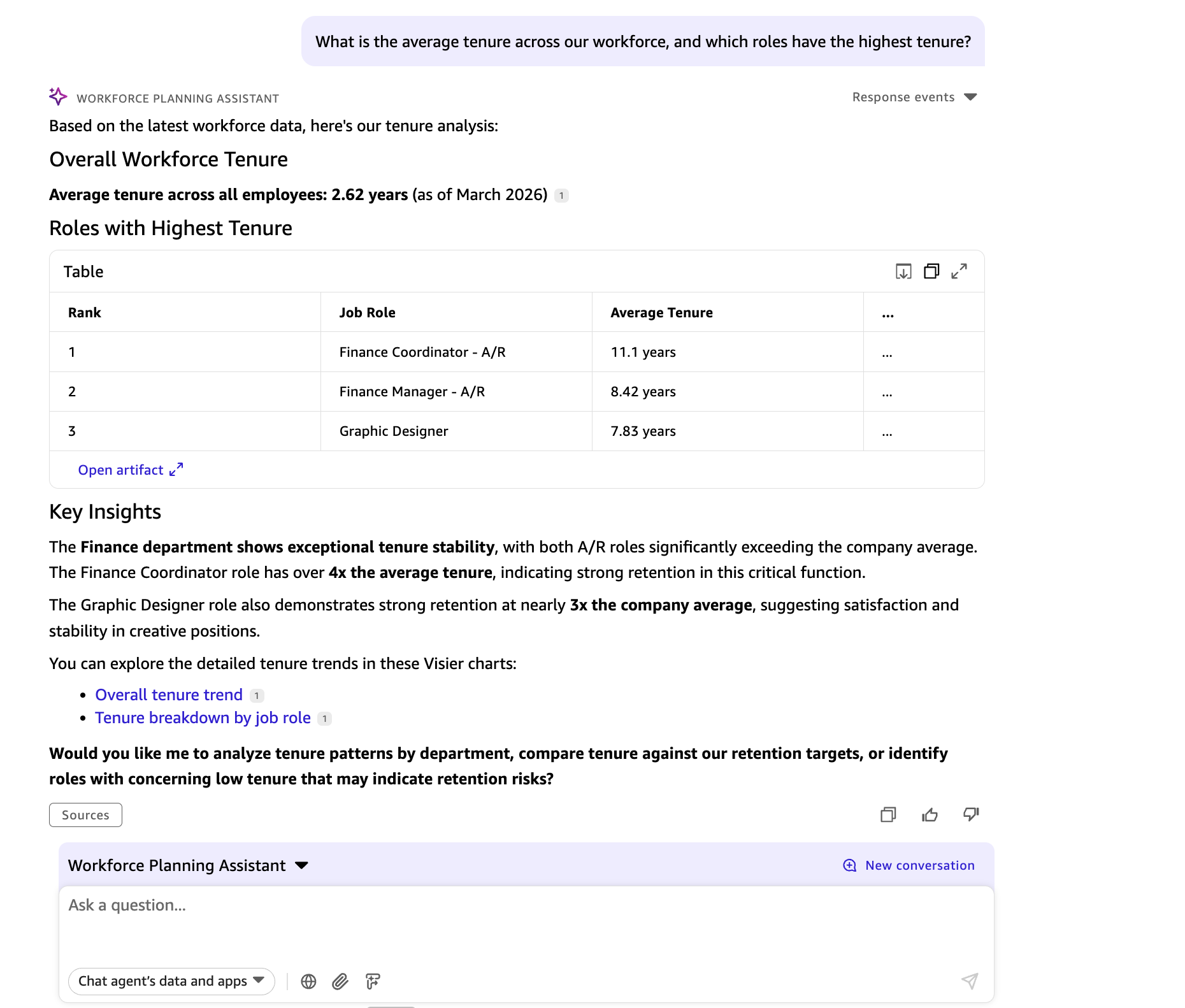
The Amazon Quick agent retrieves average tenure and role-level tenure breakdowns from Visier, then surfaces the relevant tenure milestones from the Tenure and Retention Policy in Quick Spaces.
Sources queried: Visier (tenure data) · Quick Spaces (Tenure and Retention Policy)
Turn 4 : Tenure against policy thresholds
Maya: Does our average tenure meet the threshold in our retention policy?
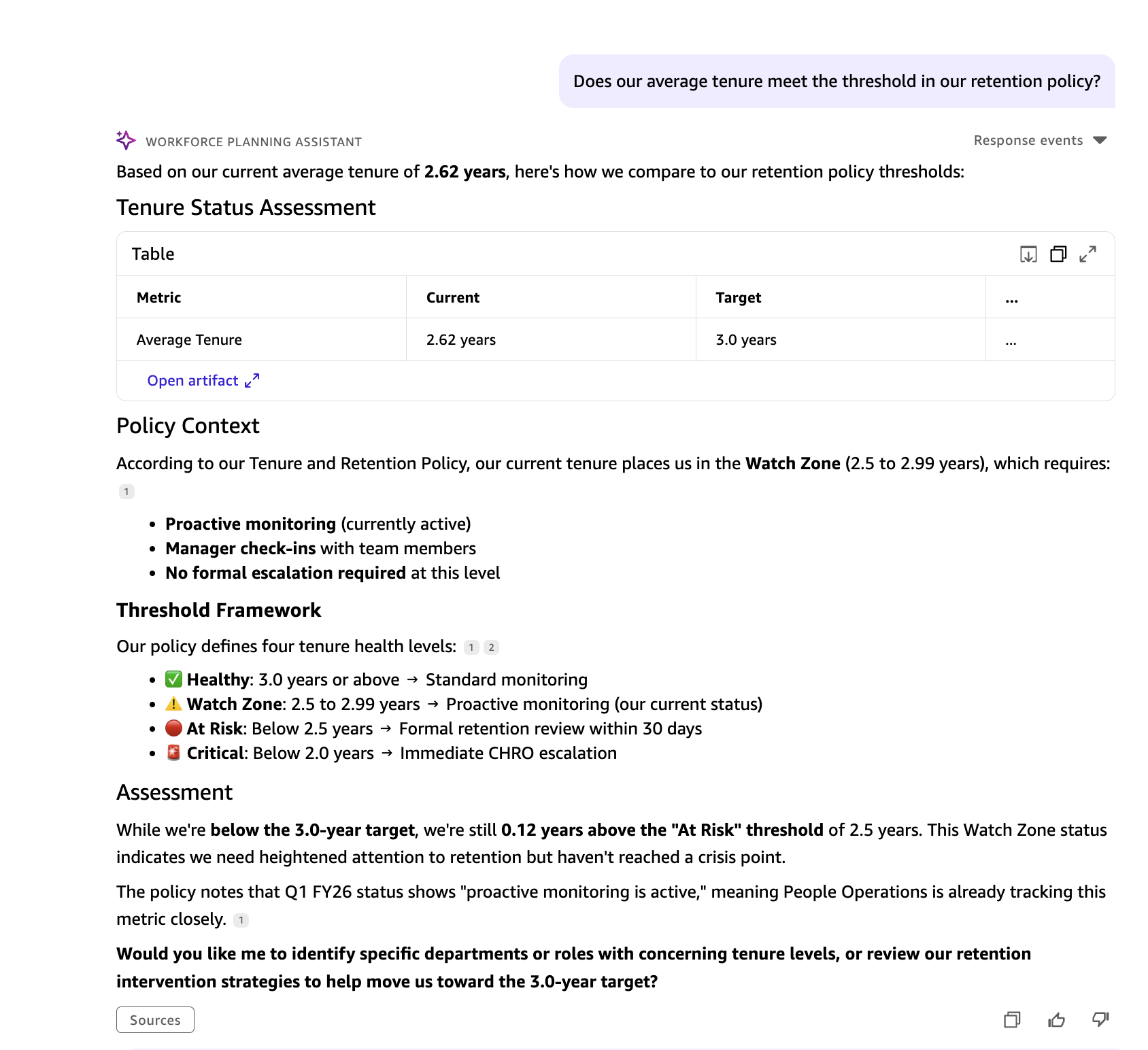
The Amazon Quick agent compares Visier’s live average tenure figure against the threshold defined in the Tenure and Retention Policy stored in Quick Spaces, flagging whether the organization meets or falls short of its target.
Sources queried: Visier (average tenure) · Quick Spaces (Tenure and Retention Policy)
Turn 5 : High Performer health check
Maya: How many high performers do we have, and are we within the recommended ratio?
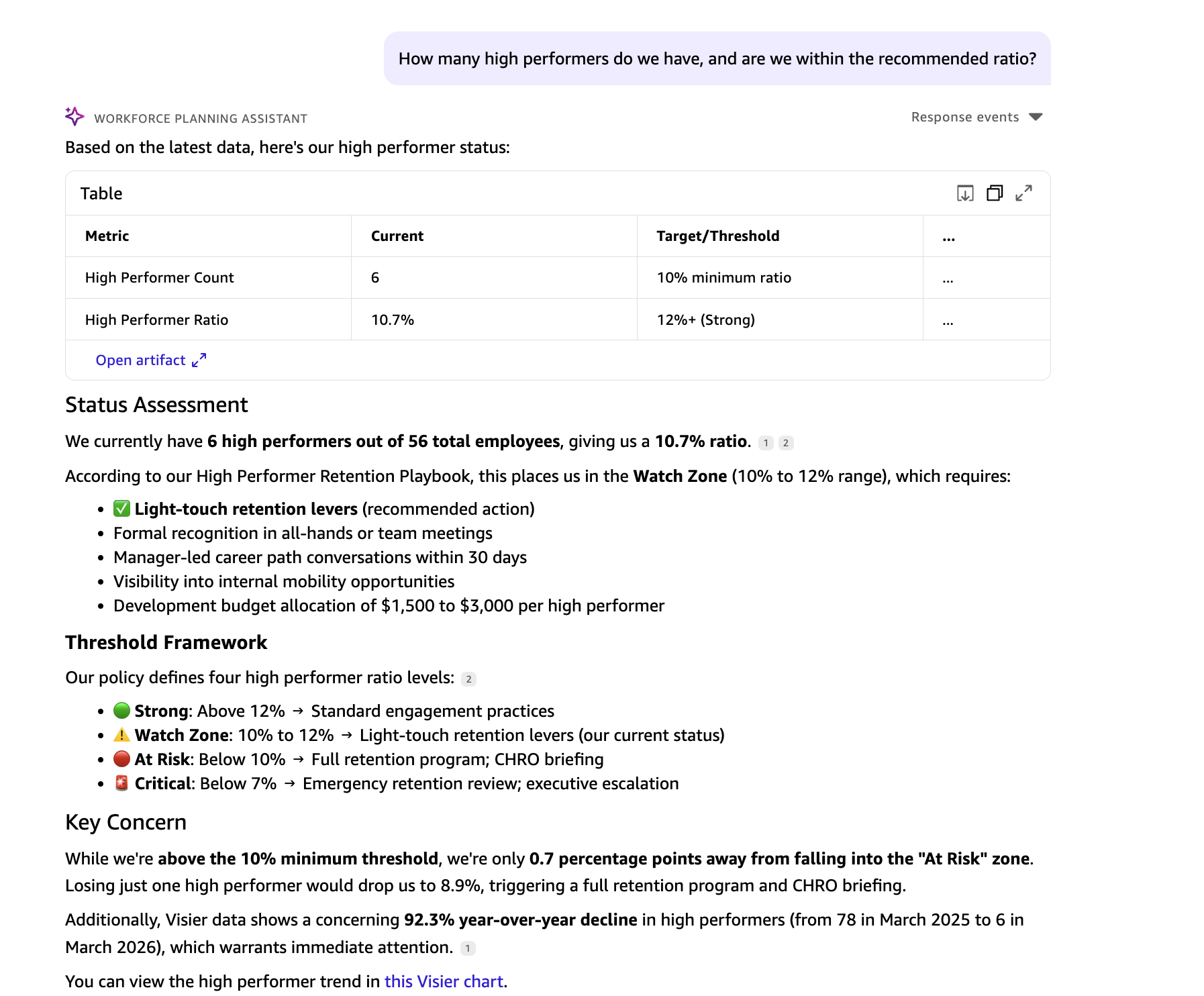
The Quick agent pulls the current high performer count from Visier and checks it against the recommended ratio in the High Performer Retention Playbook from Quick Spaces.
Sources queried: Visier (high performer count) · Quick Spaces (High Performer Retention Playbook)
Turn 6 : Leadership briefing synthesis
David and Maya: Summarize the key workforce health risks for our leadership briefing.
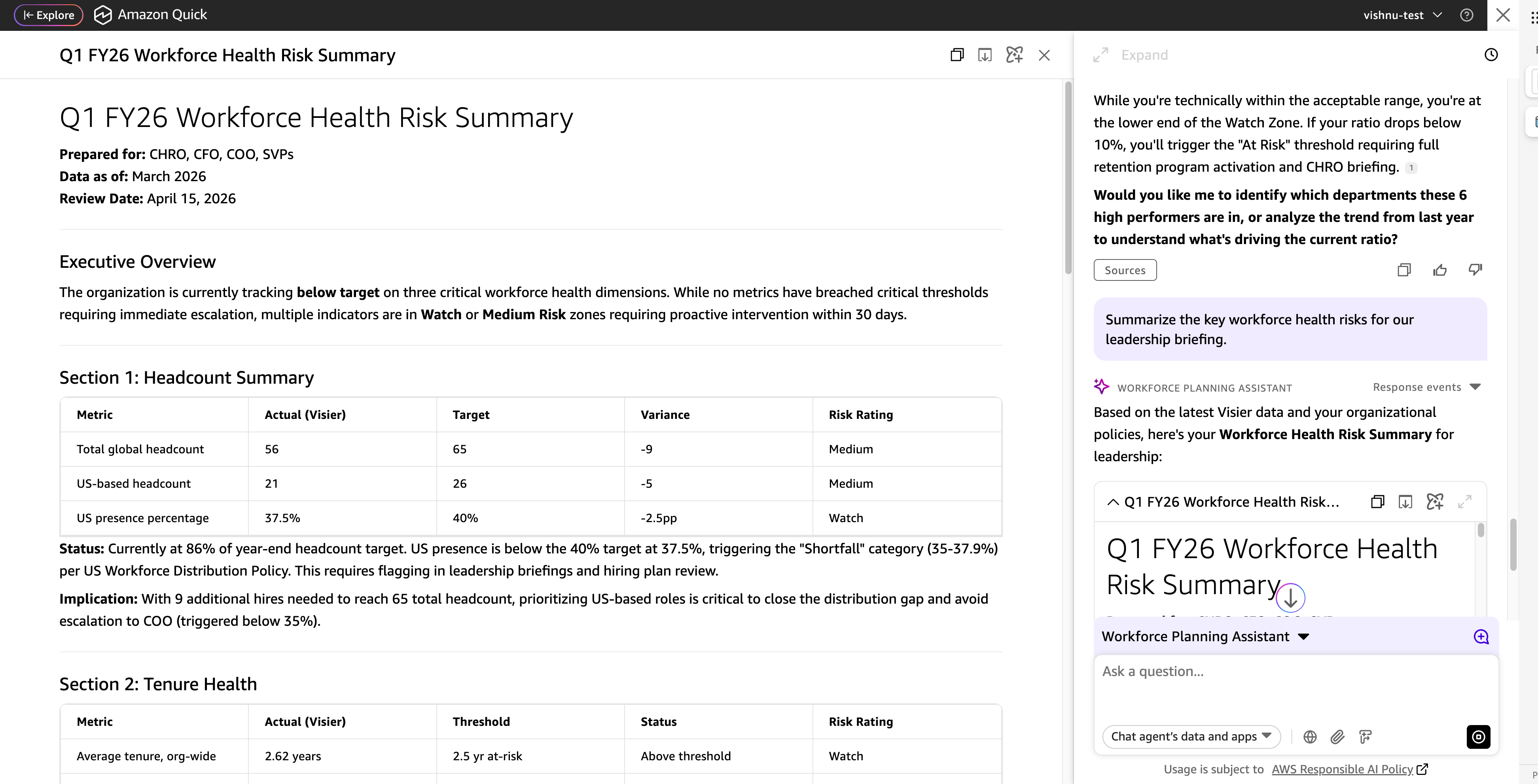
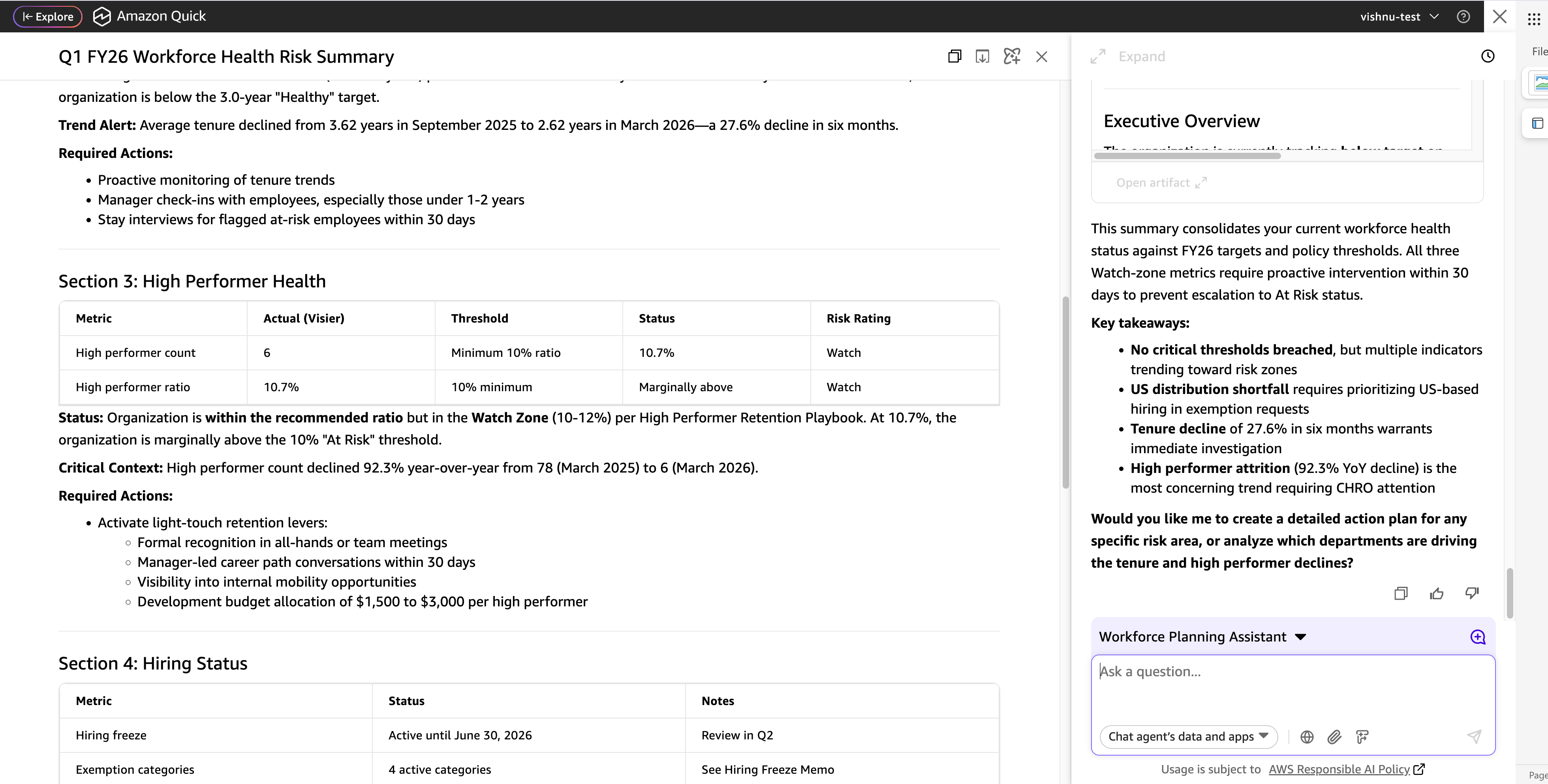
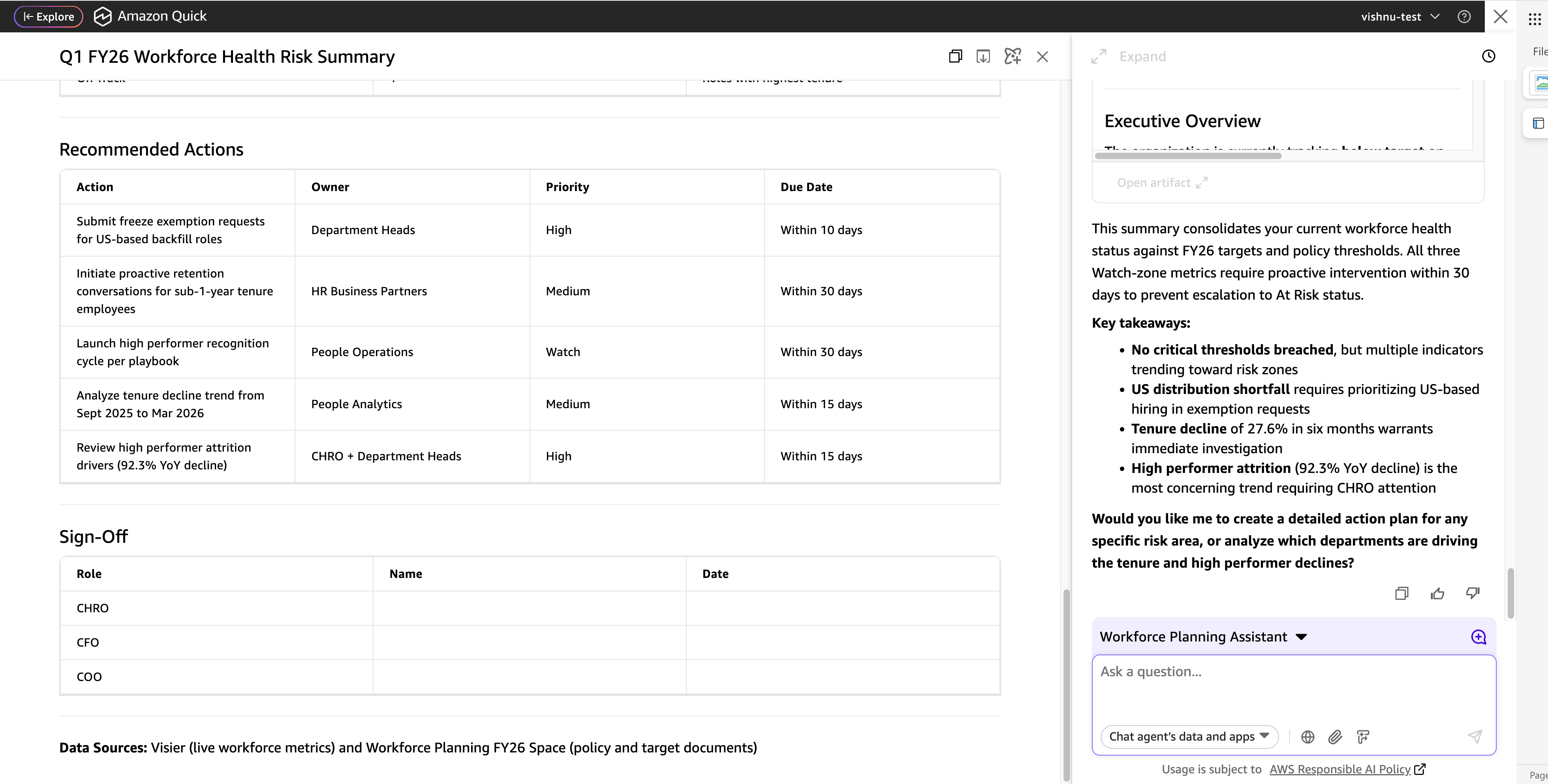
The Amazon Quick agent pulls together the workforce data retrieved from Visier across the prior turns) and cross-references each metric against the corresponding thresholds and policies stored in Quick Spaces. Where a metric falls short of its target, the agent flags it as a risk and surfaces the recommended action from the relevant policy document. The result is a single briefing that covers every dimension discussed in the conversation, with each finding attributed to its data source.
Sources queried: Visier (all workforce data from prior turns) · Quick Spaces (all policy and target documents)
Taking it further with Quick Flows
Beyond conversational queries, Amazon Quick includes Quick Flows, a workflow automation engine that you can use to define multi-step sequences and run them on a schedule or on demand. A flow can retrieve data from connected sources, apply logic or comparisons, generate formatted outputs, and deliver results to a destination like an inbox or Slack channel, all without manual intervention. If you find yourself repeating the same multi-turn conversation with a Quick Agent every week or month, Quick Flows turns that conversation into a self-running flow. You define the steps once, connect your data sources through the same MCP integrations used in chat, and set a cadence. From there, the flow executes end to end and delivers the result.
The multi-turn conversation Maya and David completed demonstrates the kind of recurring workflow that benefits from automation. Every month, the same questions arise. How close are we to our headcount target? Is tenure trending in the right direction? Is the high performer ratio holding? Rather than running through these questions manually each time, Quick Flows can execute the entire sequence on a schedule and deliver a ready-to-share briefing.
The following flow, called Weekly Workforce Health Score, runs every Monday morning. It retrieves live data from Visier, compares each metric against the thresholds stored in Quick Spaces, computes a composite score, and drafts a formatted briefing, without any manual input.
Sample Prompt to create a weekly Workforce Health Score flow like below :
Run this flow every Monday at 8:00 AM. Execute the following steps in sequence:
Step 1 — Retrieve live workforce data
Query the connected Visier MCP server for the following four metrics as of the most recent available date:
1. Total global headcount
2. US-based headcount
3. Organization-wide average tenure
4. Total count of high-performing employees
Step 2 — Retrieve internal targets and thresholds
Search the “Workforce Planning” space in Amazon Quick for the following values:
1. Year-end headcount target
2. US headcount target and percentage target
3. Average tenure threshold and watch zone lower bound
4. Minimum high performer ratio threshold
Use the FY26 Workforce Health Targets, Tenure and Retention Policy, High Performer Retention Playbook, and US Workforce Distribution Policy documents.
Step 3 — Calculate workforce health metrics
Using the values retrieved in Steps 1 and 2, calculate the following:
1. Headcount percentage to goal
2. Hires remaining to close the gap
3. US headcount percentage of total
4. US headcount gap to target (in headcount and percentage points)
5. High performer ratio
6. High performer buffer above the minimum threshold
7. Tenure buffer above the watch zone threshold
Step 4 — Score each metric
Assign a score to each of the four metrics using the following logic:
– On Track (meets or exceeds target): 25 points
– Needs Attention (within 5% of threshold): 15 points
– Below Target (threshold not met): 5 points
– Needs Immediate Review (significantly below threshold): 0 points
Sum the four scores to produce a composite Workforce Health Score out of 100.
Step 5 — Retrieve recommended actions for flagged metrics
For any metric scored at “Needs Attention” or below, retrieve the relevant intervention section from the corresponding Quick Spaces policy document.
Step 6 — Draft a formatted briefing
Compose a structured summary containing:
1. The composite score out of 100
2. A table showing each metric with its actual value, target, calculated gap, and score
3. A one-line status summarizing how many metrics need attention
4. The recommended actions from Step 5 listed by priority
Format this as a ready-to-share briefing.
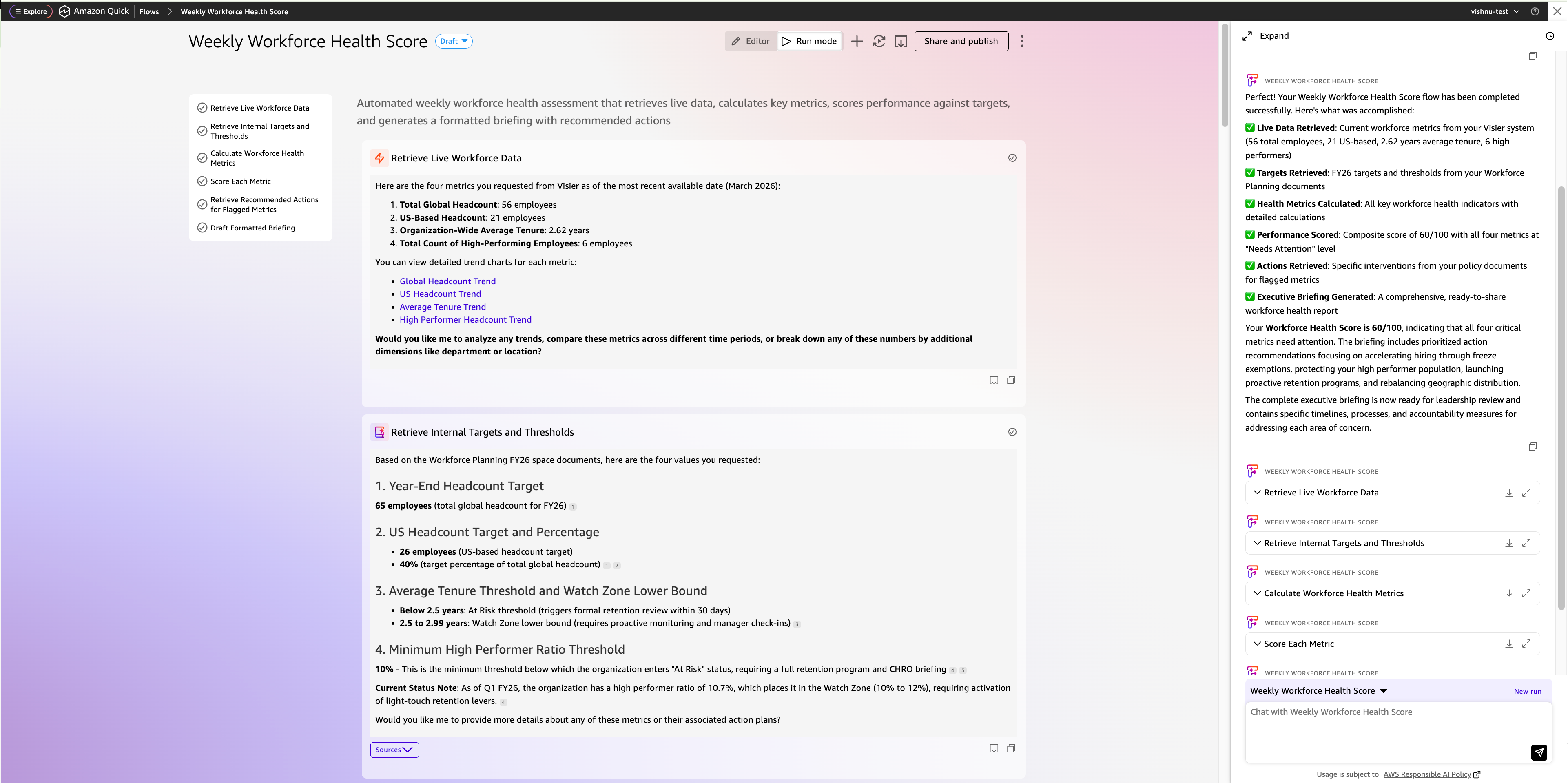
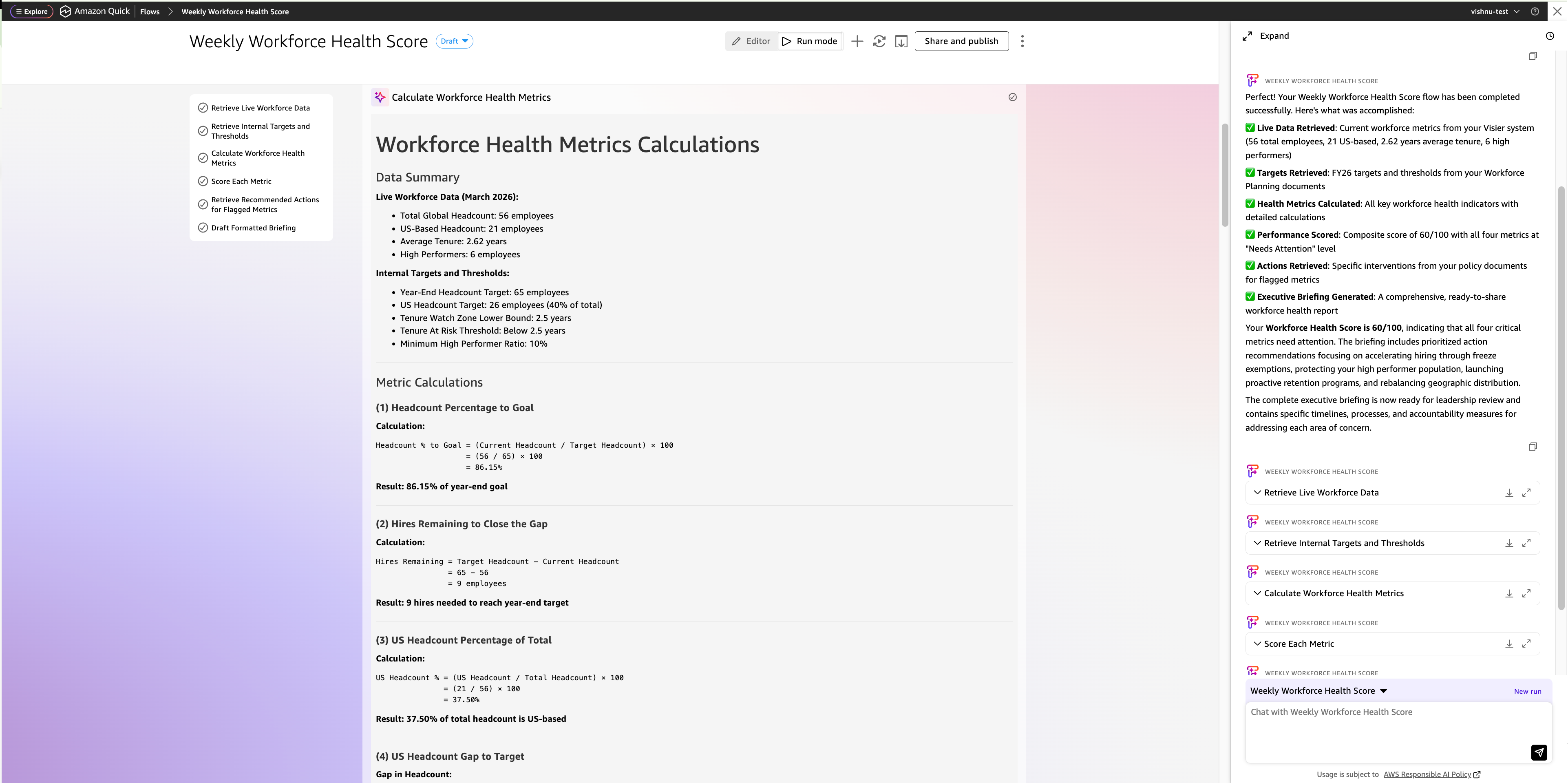
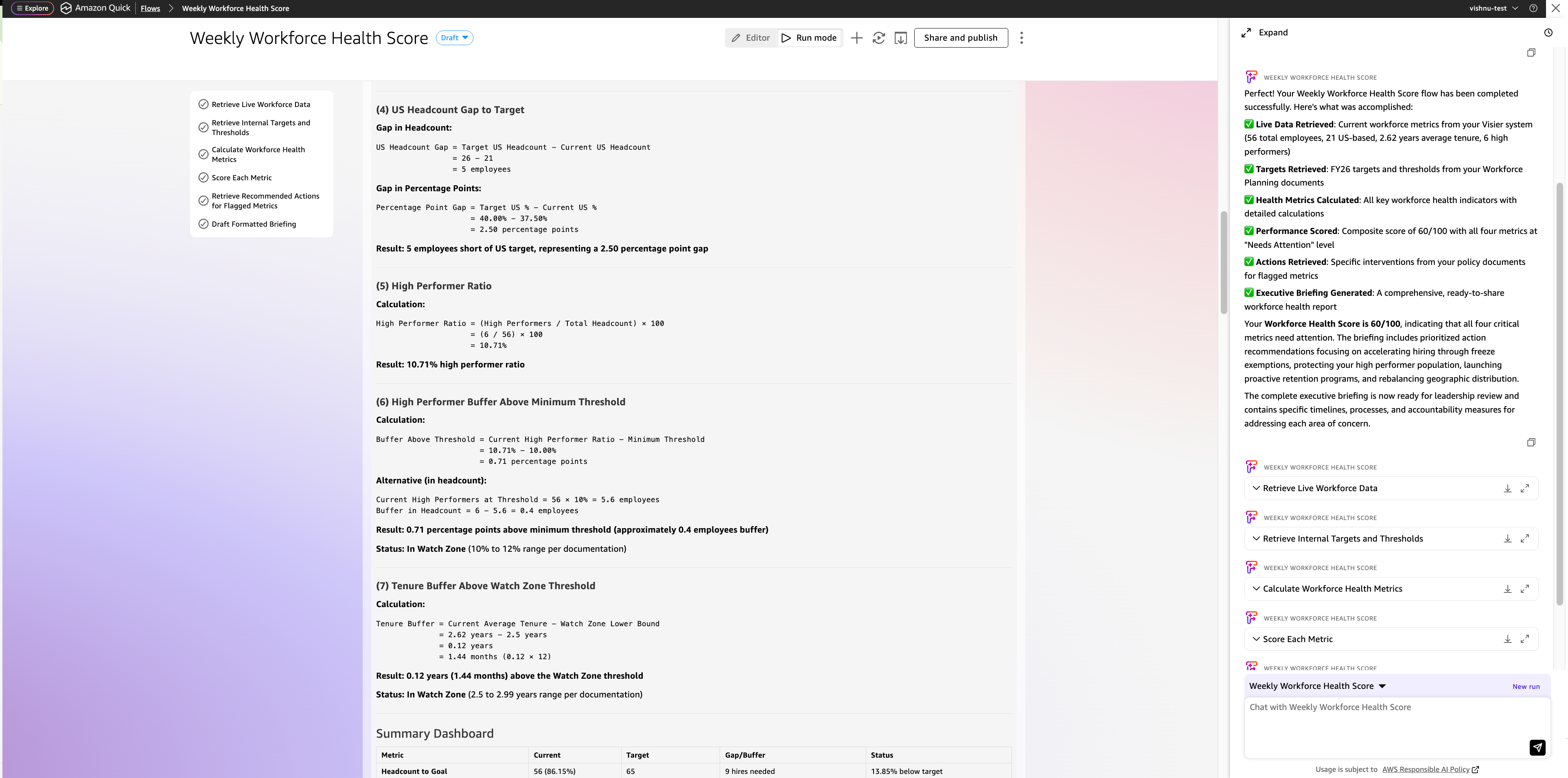
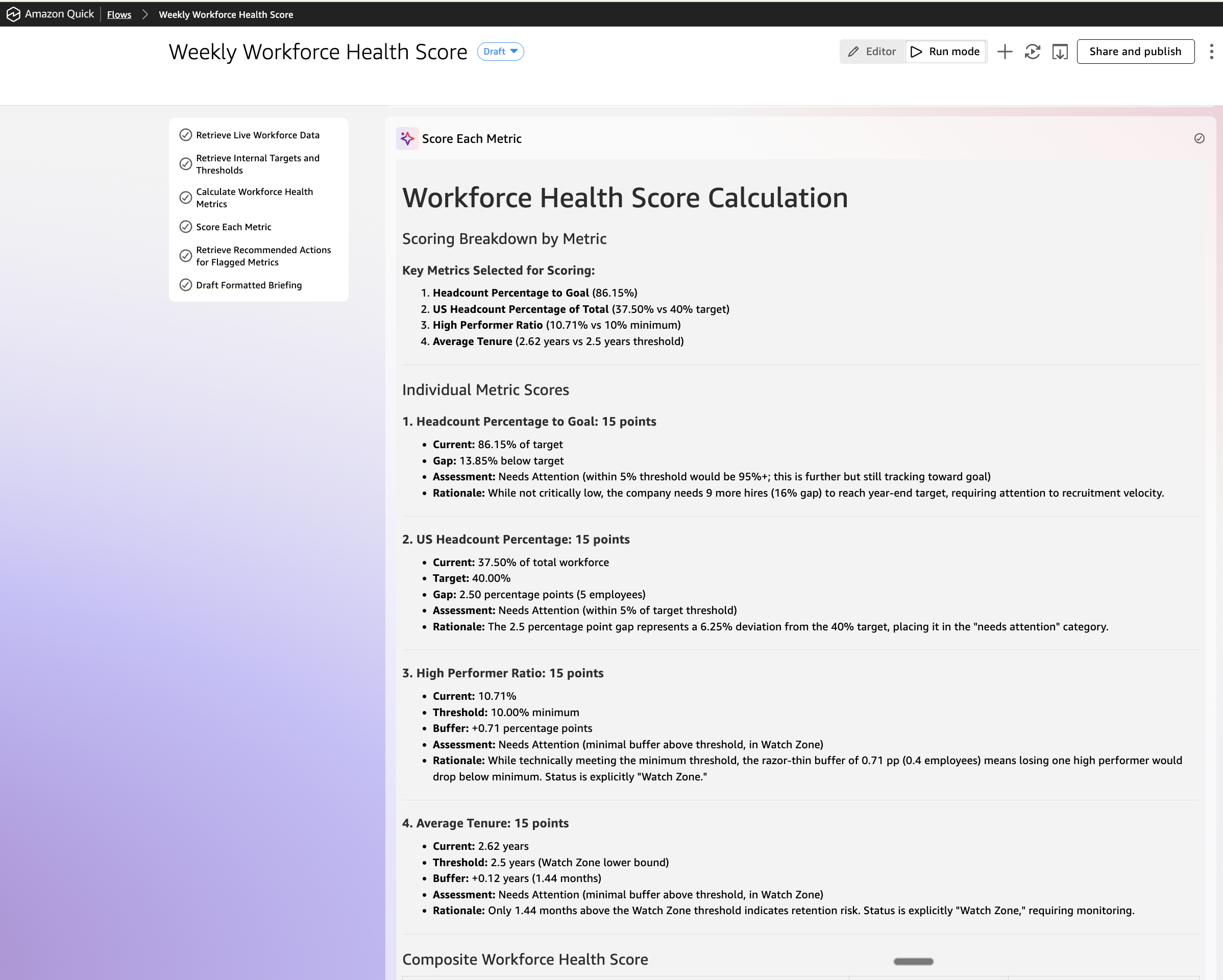
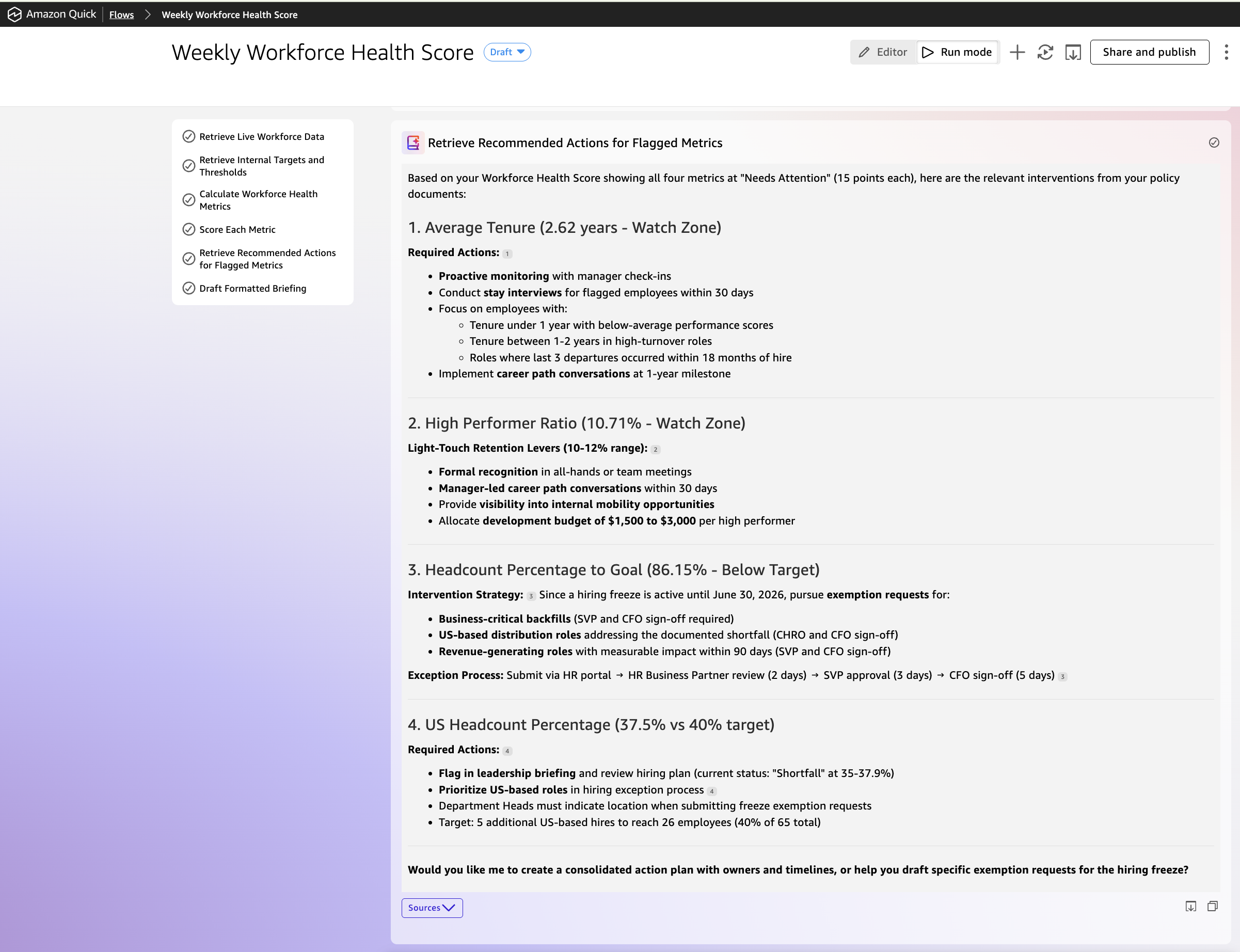
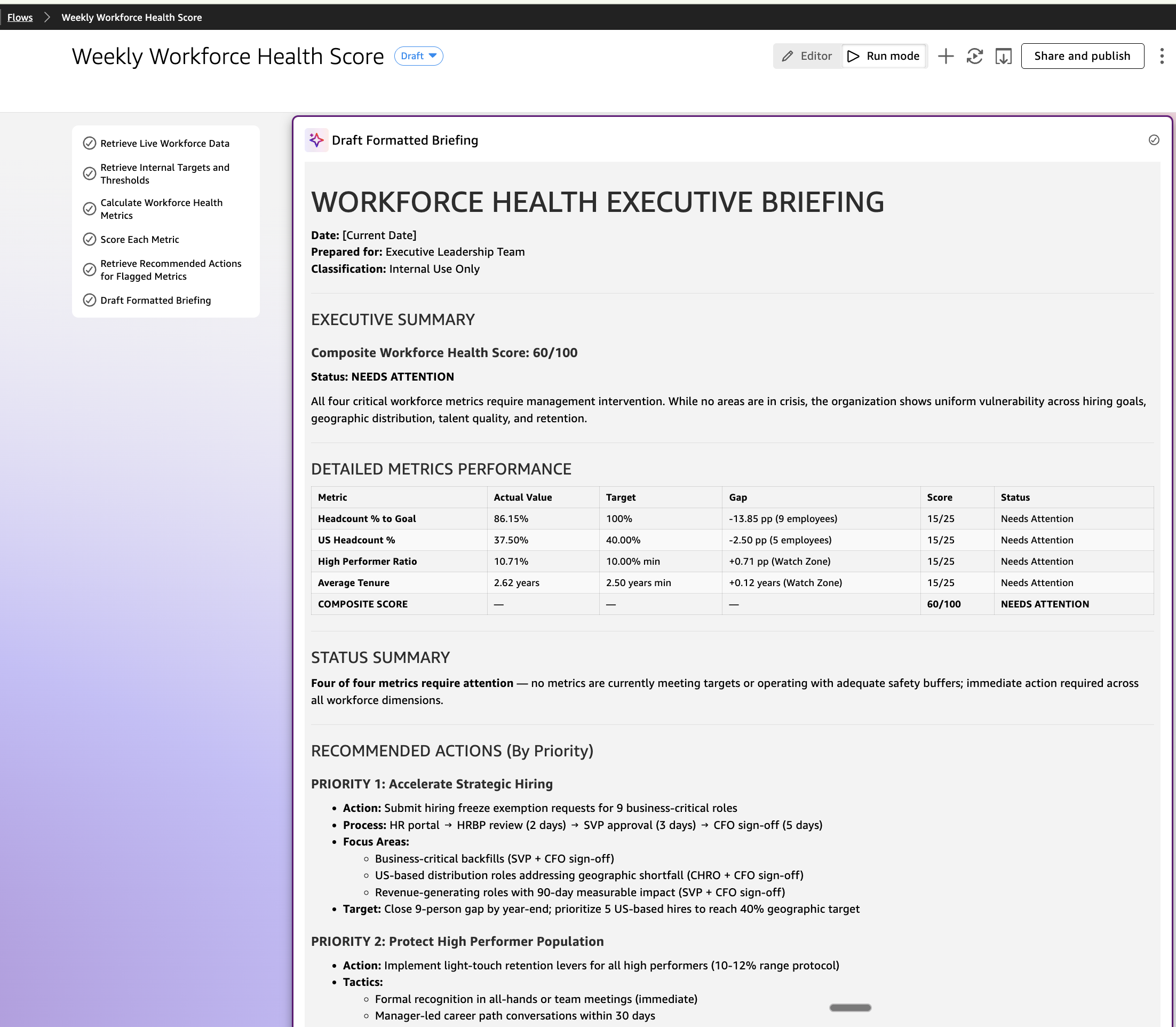
The output is a composite score out of 100, a metric table showing where the organization stands against each target, and a set of recommended actions drawn directly from the relevant policy documents. When a metric needs attention, the briefing tells you what the policy says to do about it.
After your enterprise integrations are connected, an optional step can automatically deliver this briefing to a specified inbox or Slack channel on schedule. This is what Quick Flows makes possible, a recurring, multi-source workflow that previously required a manual conversation becomes something that runs itself and shows up in your inbox.
Example Quick Research project
Amazon Quick also includes Quick Research, a deep analysis capability designed for questions that span multiple sources and require synthesis rather than a single lookup. Where a chat conversation is interactive and iterative, Quick Research runs autonomously you describe the outcome you need in natural language, and Quick determines which internal knowledge bases, connected data sources, and external references to query, then assembles a structured, source-attributed report.
Before the leadership meeting, Maya launches a Quick Research independently, outside the agent conversation. She doesn’t specify which systems to search or where the data lives, she just describes what she needs.
Maya’s Quick Research prompt:
Prepare a workforce benchmarking report ahead of our leadership meeting. I need to understand how our organization compares to industry peers across three areas: employee tenure, high performer ratios, and workforce distribution across geographies. For each area, show me where we stand today, what the industry norm looks like, and whether we are ahead, at par, or behind. Include our internal targets where relevant.
Structure the output as an executive summary, a side-by-side benchmark comparison with color-coded risk ratings, and a gap analysis with three to five prioritized recommendations. Include a benchmark comparison chart and a visual gap indicator table. Cite all external sources and attribute all internal data to its origin.
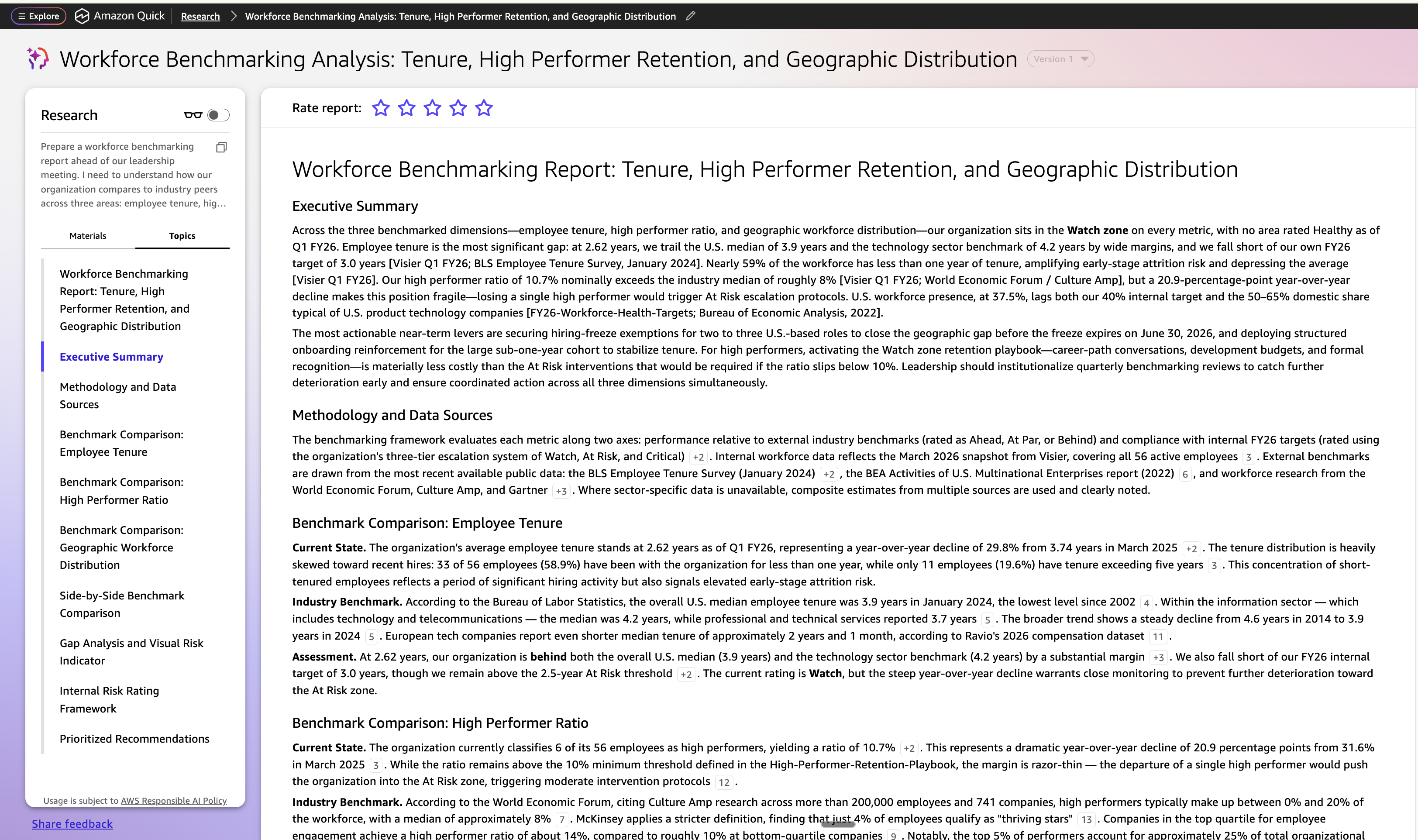
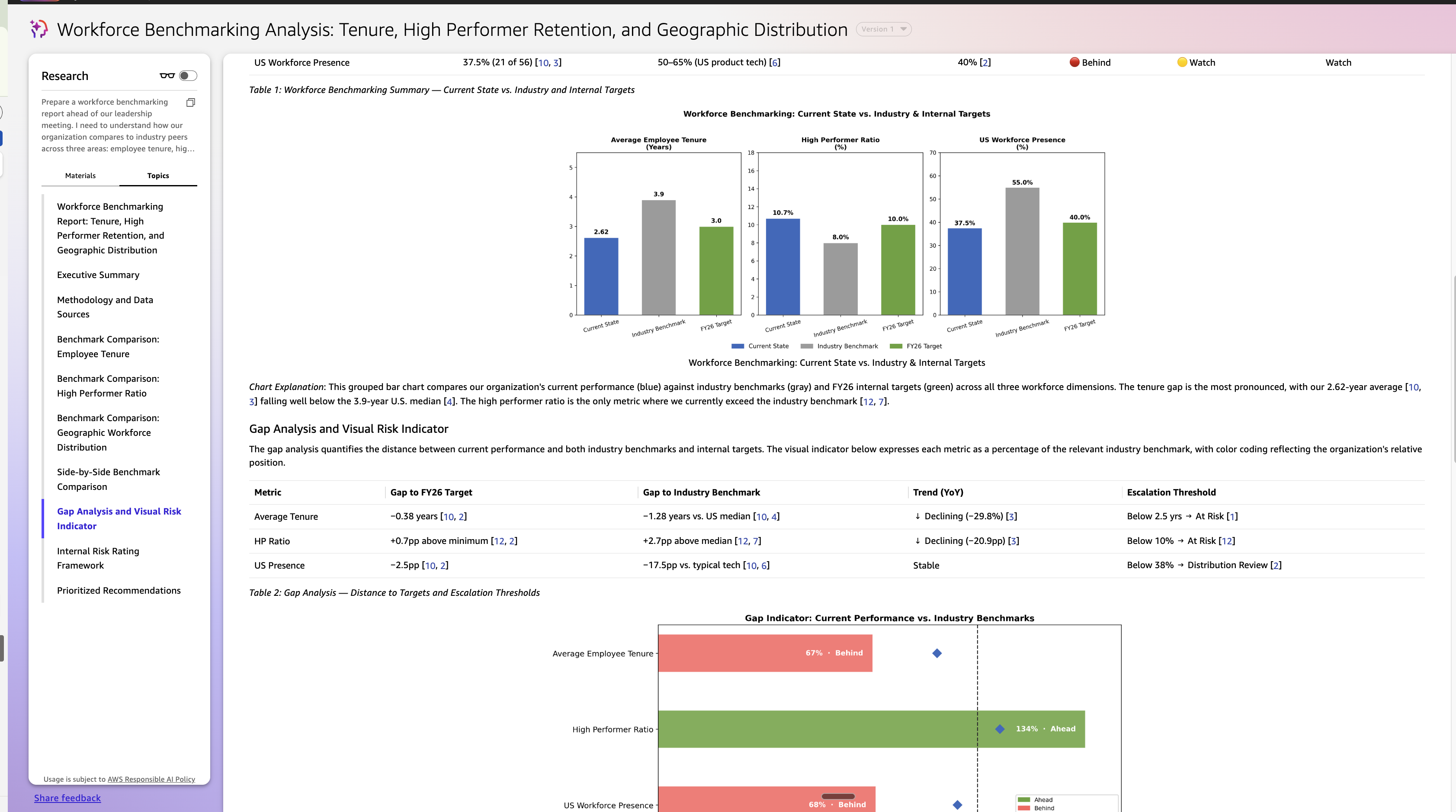
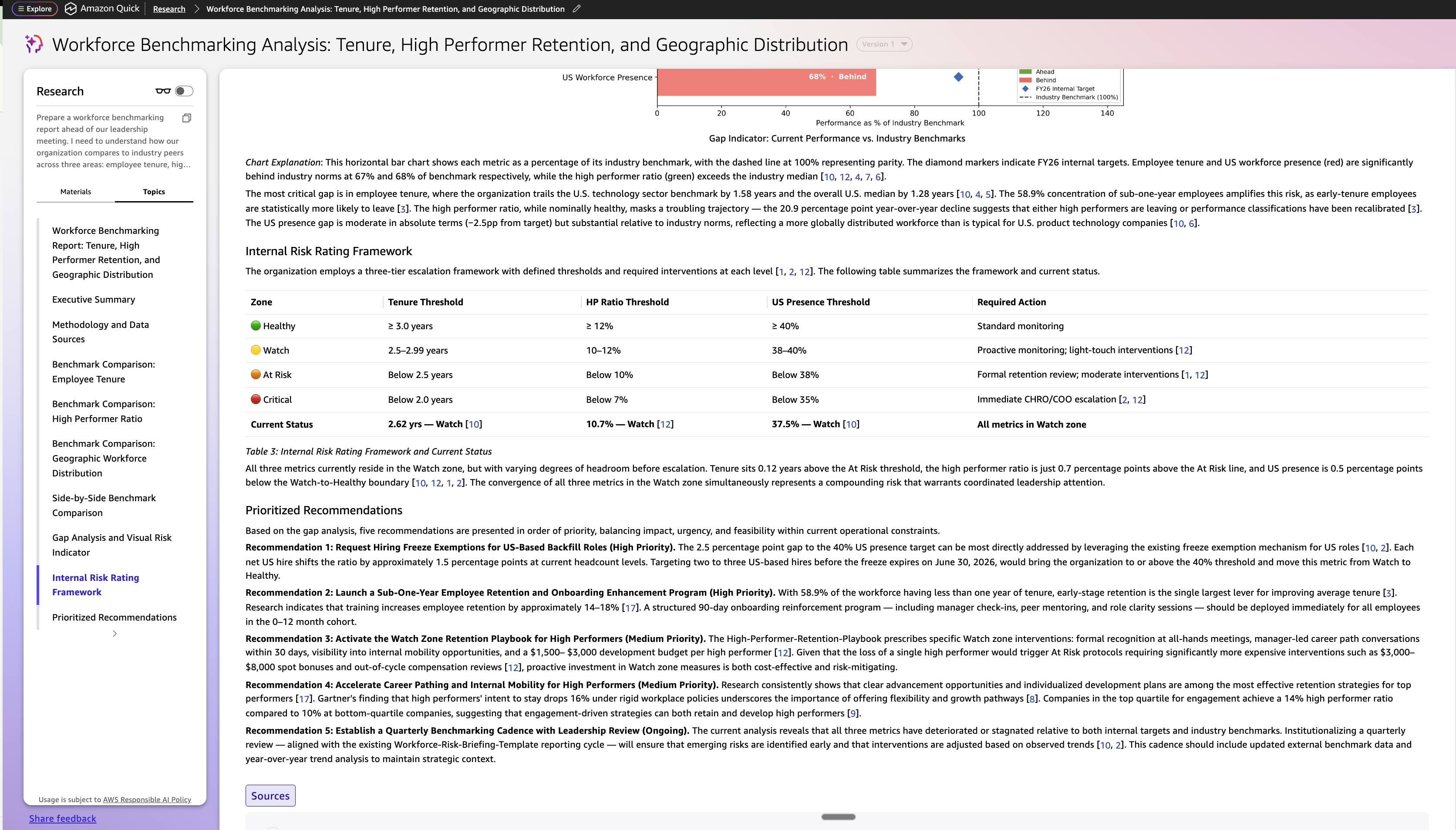
Quick Research automatically draws from all three layers, live workforce data from Visier using the MCP server, internal policy targets from the Workforce Planning Quick Space, and external industry benchmarks from the web, and produces a structured, source-attributed research brief. The report is downloaded by Maya and shared with David before the meeting. It serves as the external context layer that enriches the agent conversation, giving both personas a shared starting point grounded in data from inside and outside the organization.This is what makes Quick Research distinct: the user describes the outcome that they need, Quick’s intelligence knows where to look and does deep research, and brings an actional comprehensive report together.
Monitoring and observability
As Quick agents query Visier MCP for live workforce data and retrieve policies from Quick Spaces, administrators need visibility into what is being accessed, how often, and by whom. Amazon Quick integrates with Amazon CloudWatch to surface MCP action connector metrics such as invocation counts and error rates, so teams can track how frequently Visier’s MCP tools are called across agent conversations, flows, and research runs. Every chat interaction, including which connectors were invoked and which resources were cited in the response, can be delivered through Amazon CloudWatch Logs to destinations like Amazon Simple Storage Service (Amazon S3) or Amazon Data Firehose for analysis and long-term retention. For audit and compliance, AWS CloudTrail provides a complete record of API calls and administrative actions across the Amazon Quick environment, answering questions like which user queried workforce tenure data, when the request was made, and what context it was part of. Together, these capabilities make sure that every interaction between Visier and Amazon Quick, from a Quick chat agent query to a scheduled flow, remains observable, auditable, and governed.
Clean up
When you’re done using this integration, clean up the resources that you created:
- Remove the MCP integration from Amazon Quick:
- From the Amazon Quick home screen, navigate to Integrations in the left navigation panel.
- Select the Actions tab, locate the Visier MCP integration, and choose Remove.
- This stops Visier data from being accessible through Amazon Quick.
- Revoke Visier MCP credentials:
- In the Visier admin console, navigate to Settings > API & Integrations.
- Revoke the MCP server credentials used for the Amazon Quick connection.
- Remove Quick Spaces content (optional):
- If you created Quick Spaces specifically for this integration, navigate to Spaces in Amazon Quick and delete them.
- Delete the Amazon Quick environment (optional):
- If you no longer need the Amazon Quick environment, navigate to the AWS console and delete the associated resources.
- This removes the associated indexes, integrations, and data source connectors.
Conclusion
The integration of Visier and Amazon Quick via MCP demonstrates a pattern that extends beyond people analytics to any scenario where specialized business intelligence must be grounded in organizational context.The value isn’t in either system alone. Amazon Quick provides the orchestration layer and enterprise context. Visier provides the workforce intelligence. MCP provides the secure, standardized connection between them. For the end user, the experience is simple: ask a question, get an answer that draws on everything the organization knows, and act on it without switching tools.The same architecture applies across Finance, Operations, Sales, Marketing, and Legal. Wherever workforce data and organizational context need to come together, Amazon Quick and Visier, connected using MCP, make that possible in a single conversation.
Next steps
Ready to bring workforce intelligence into your agentic AI workspace? Start by visiting the Amazon Quick documentation to set up your environment, configure integrations, and begin building agents and automations. For the Visier side, the Visier MCP Server documentation walks through setup instructions, authentication configuration, and the full set of available workforce analytics tools.
To learn more about Visier’s Workforce AI platform, visit visier.com. For a deeper look at how Amazon Quick connects to external data sources through the Model Context Protocol, read Integrate external tools with Amazon Quick Agents using MCP.
About the authors